



Most people don’t ignore your PitchCard because it isn’t useful.
They ignore it because of how it’s shared.
Links don’t earn clicks on their own. They get clicked when the context feels human, relevant, and easy.
Below are five practical ways to share your PitchCard so it feels like a natural introduction—not a pitch.
Why People Click (A Simple Truth)
People click when:
- The action feels easy
- They know what to expect
- They feel confident sharing or saving it
Your job isn’t to sell the link. It’s to reduce effort and increase confidence.

1. Email: Make the Click Feel Helpful, Not Required
Best use: Intros, warm follow-ups, post-meeting recaps
Example
“Here’s my PitchCard in case it’s helpful later—it gives a quick snapshot of what I do and who I work best with.”
Extra tip:
Add your PitchCard to your email signature. It quietly introduces you every time you send a message—no extra ask, no extra explanation.
Why this works:
You’re giving them a low-effort way to understand and remember you, without asking them to do anything right now.
2. LinkedIn DM: Make Introductions Easy
Best use: New connections, referral partners, post-comment conversations
Example
“If you ever need to introduce me, this makes it easy—my PitchCard is a short intro you can share instead of trying to summarize what I do.”
Why this works:
You’re not asking for a referral. You’re increasing their confidence by removing the effort and risk of explaining you incorrectly.
3. Bio Link: One Clear Promise Beats Five Options
Best use: Professional profiles and personal sites
Example
"New here? This is my 59-second intro →"
Why this works:
People know exactly what they’re clicking and how much time it takes. Clear expectations reduce hesitation.
4. QR Code (In Person): Use It as an Introduction or Reminder
Best use: Events, meetups, conferences
Example
“This QR links to a quick intro—it shows who I am and what I do so it’s easy to remember me later.”
Why this works:
You’re giving them a simple way to save your information and recall you accurately after the moment passes—without relying on memory or notes. No app needed.
5. Follow-Up Message: Reinforce Who You Are
Best use: After coffee chats, Zoom calls, networking events
Example
“Great connecting earlier—this PitchCard gives a quick overview of who I am and what I do, so it’s easy to reference or share if needed.”
Why this works:
You’re reinforcing clarity and making future sharing effortless, which builds confidence instead of pressure.
The Big Takeaway
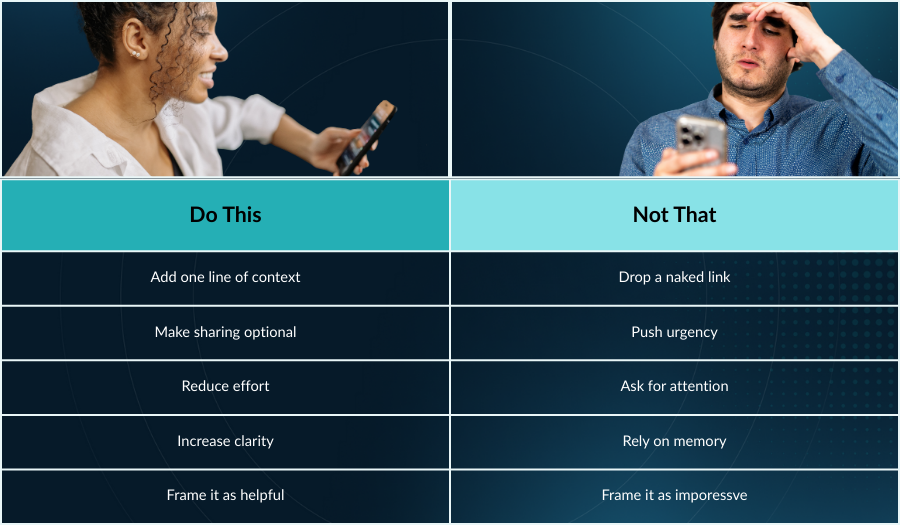
You know the saying, "Quality is better than quantity." This is similar: the best-performing PitchCards aren’t shared more often. They’re shared more thoughtfully.
Every great share does two things:
- Lowers the effort to understand you
- Raises the confidence to introduce you
Do that, and clicks follow naturally.
Your Next Step
If you already have a PitchCard, try sharing it this week using just one of these approaches.
If you don’t have one yet, you can create a free PitchCard that introduces you clearly in under 59 seconds—and makes you easy to remember and easy to refer.
👉 Create or update your PitchCard and make every share feel like a confident introduction.