



When someone asks for your information, you could send your website, explain what you do, and follow up with your LinkedIn profile. Or you could send one link that brings those pieces together.
Pitch59, HiHello, Blinq, Popl, and Wave Connect all offer digital business cards that bring professional information and links into a shareable profile. Their approaches differ, from video introductions to contact exchange and sales follow-up.
The right choice depends on what you want someone to do after opening your card: explore your work, save your details, book a conversation, or introduce you to someone who needs your help.
At Pitch59, our goal is simple: Make it ridiculously easy to refer you.
Here’s how these five options compare.
What Does “Website, Bio, and Social Links” Mean?
For this comparison, “website” means a link to your existing website. A digital business card gives people a central page to explore your information, but that doesn’t necessarily mean it includes a full website builder.
A useful card brings together three essentials:
- Your website: Where someone can learn more about your services, products, or work.
- Your bio: A clear introduction to who you are and what you do.
- Your social links: The profiles where people can get to know you and stay connected.
Once those basics are covered, consider how the card helps you introduce yourself and how easily another person can pass it along.
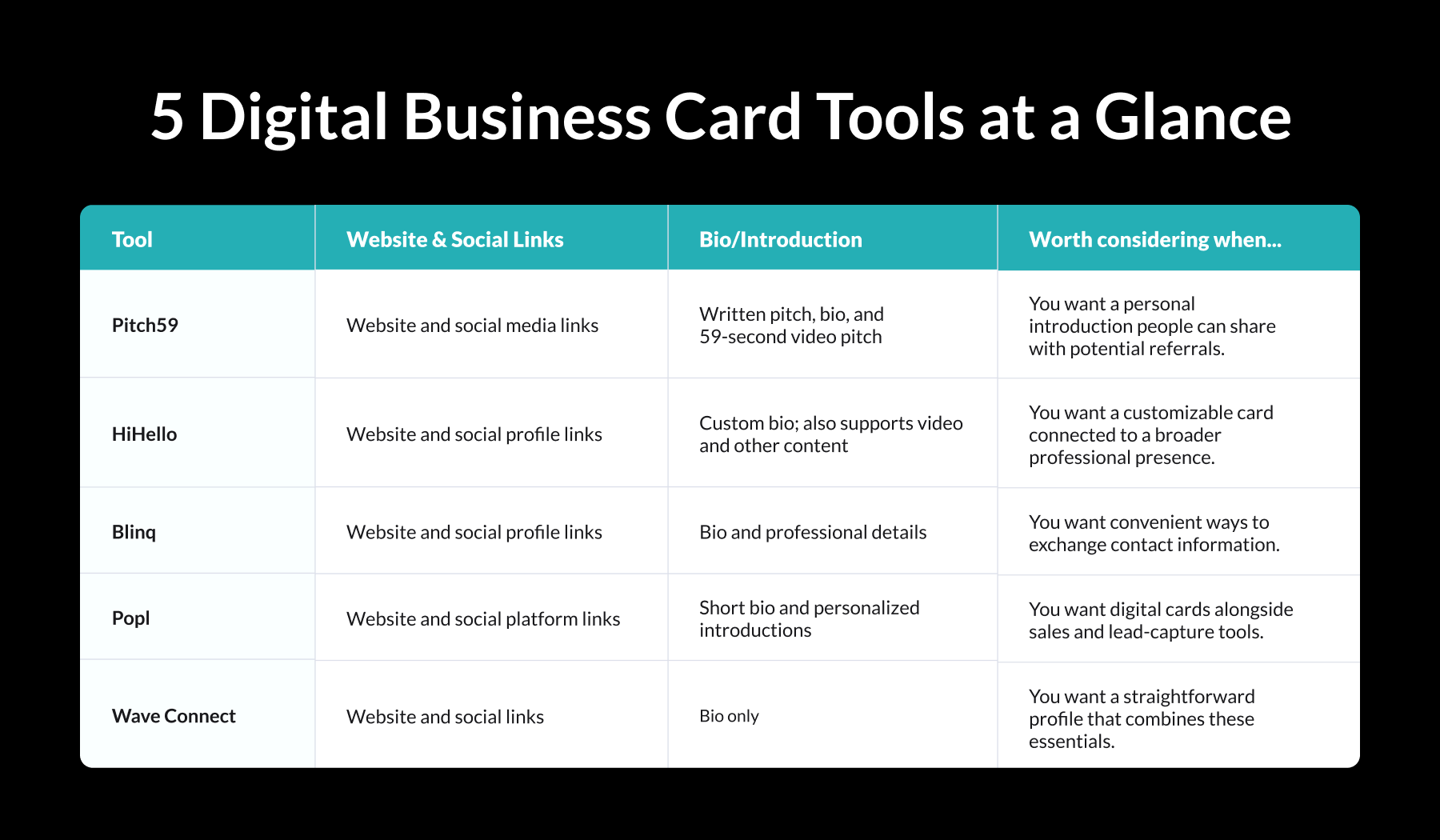
These are use-case suggestions, not performance rankings. The descriptions below link to each provider’s published information; feature availability may depend on the plan.
Pitch59: Put a Personal Introduction Behind Your Links
Pitch59’s PitchCard brings together your website, social media links, written pitch, and bio with a 59-second video introduction. People can hear your voice, see your personality, and learn what you do before reaching out. Explore PitchCard features.
That introduction is easy for you to share—and easy for someone else to pass along.
Every PitchCard has its own unique link. You can send it by text, email, or social media, and a referral partner can share that same link with someone who needs your services. The person receiving your PitchCard doesn’t need the Pitch59 app to view it. Learn about sharing a PitchCard.
Here’s how that can work: a past client hears a friend mention a problem you solve. They send your PitchCard with a quick message: “You should talk to this person.” Their friend can watch your introduction, explore your links, and find your contact information in one place.
Your client doesn’t have to recreate your pitch or search for several links. Your PitchCard gives them an introduction that’s ready to share.
Consider Pitch59 if: ou want to make introductions easier for the people who already know and trust you—and more personal for the people they introduce you to.
HiHello: Bring Your Professional Presence Together
HiHello combines website and social links with customizable professional information. It supports a custom bio, and its digital cards can also include videos and other content. See HiHello’s plan guide and card features.
HiHello also connects digital cards with email signatures and virtual backgrounds. That makes it worth exploring if you want consistent information and branding across several places where people encounter you.
Cards can be shared through links, QR codes, text, and other methods, and recipients do not need the app to view them. Explore HiHello’s sharing options.
Consider HiHello if: Customization and a consistent professional presence across your card, email, and meetings are priorities.
Blinq: Make Contact Exchange Convenient
Blinq lets you add your website, professional details, and social links to a digital business card. Its guidance also covers including a short bio. Explore Blinq’s setup guide and bio guidance.
Sharing is a central part of the experience. You can send a card link, show a QR code, or use an optional NFC card to share your details with a tap.
For someone who regularly meets clients, colleagues, or potential partners, those options can make it convenient to keep a card ready for different situations.
Consider Blinq if: Your main priority is sharing your contact details and key links during everyday introductions.
Popl: Connect Your Card to Sales Follow-Up
Popl’s digital cards can include a short bio, website links, and social links. It also supports different cards for different contexts, allowing users to tailor their introductions and links. Explore Popl’s card options.
Beyond sharing your own information, Popl emphasizes collecting contact information, adding notes, qualifying leads, and syncing information to a CRM. See Popl’s sales features.
That makes it relevant for teams evaluating how a digital card fits into their follow-up process after events or sales conversations.
Consider Popl if: You want to evaluate digital business cards as part of a broader sales and lead-management workflow.
Wave Connect: Combine the Essentials in One Profile
Wave Connect explicitly lists website links, social links, and a bio among the features of its individual digital business card offering. Explore Wave Connect’s individual cards.
That makes it a direct match for someone whose starting question is, “How do I put my professional information in one place?”
If your needs are focused on a clear introduction and a convenient collection of links, Wave is worth including in your shortlist.
Consider Wave Connect if: You want a straightforward way to bring your bio, website, and social profiles together.
How to Choose a Card That Helps People Refer You
A feature checklist is a useful starting point. Then look at your card from the perspective of someone recommending you.
Can they quickly understand:
- Who you help?
- What problem you solve?
- When someone should contact you?
- How to pass your information along?
For example, “I’m a business consultant” gives a reader a category. “I help owners of growing service businesses organize their operations so they can spend less time managing daily problems” gives them a reason to think of someone specific.
Whichever platform you choose, make your introduction clear, keep your links relevant, and give visitors an obvious next step.
Try a simple test: send your card to a trusted contact and ask them to explain what you do and who they would introduce you to. Their answer can reveal what your card communicates—and what needs work.
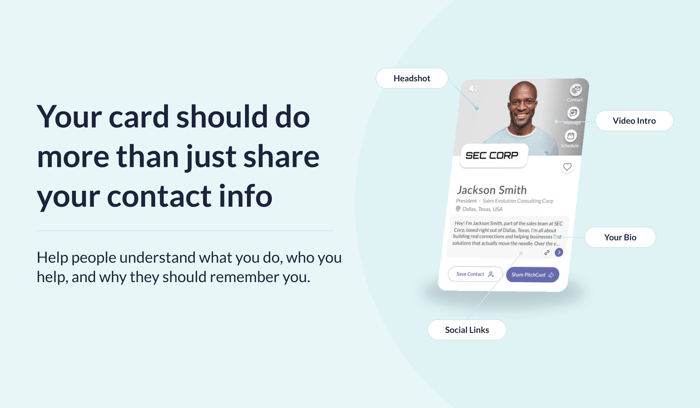
Make Your Next Introduction Easier
Pitch59, HiHello, Blinq, Popl, and Wave Connect offer different ways to bring your professional information together. Your choice should reflect how you meet people, stay connected, and grow your business.
If referrals are central to that growth, give people an introduction they can understand and confidently pass along.
Explore Pitch59 and create a PitchCard that puts your story within easy reach.
Make it ridiculously easy to refer you.